If you’ve spent any time building a homelab NAS or setting up VM storage on Proxmox, you’ve already had the ZFS-vs-Btrfs debate with yourself at 11pm. Both are powerful. Both have sharp edges. Stratis is the third option most people skip over, and with the 3.9 release shipping improved encryption support via Clevis/Tang, it’s worth a serious look.
This guide covers what Stratis actually does, where it fits versus ZFS and Btrfs, and how to get it running with encryption on a standalone Linux server or Proxmox host.
What Stratis Actually Is
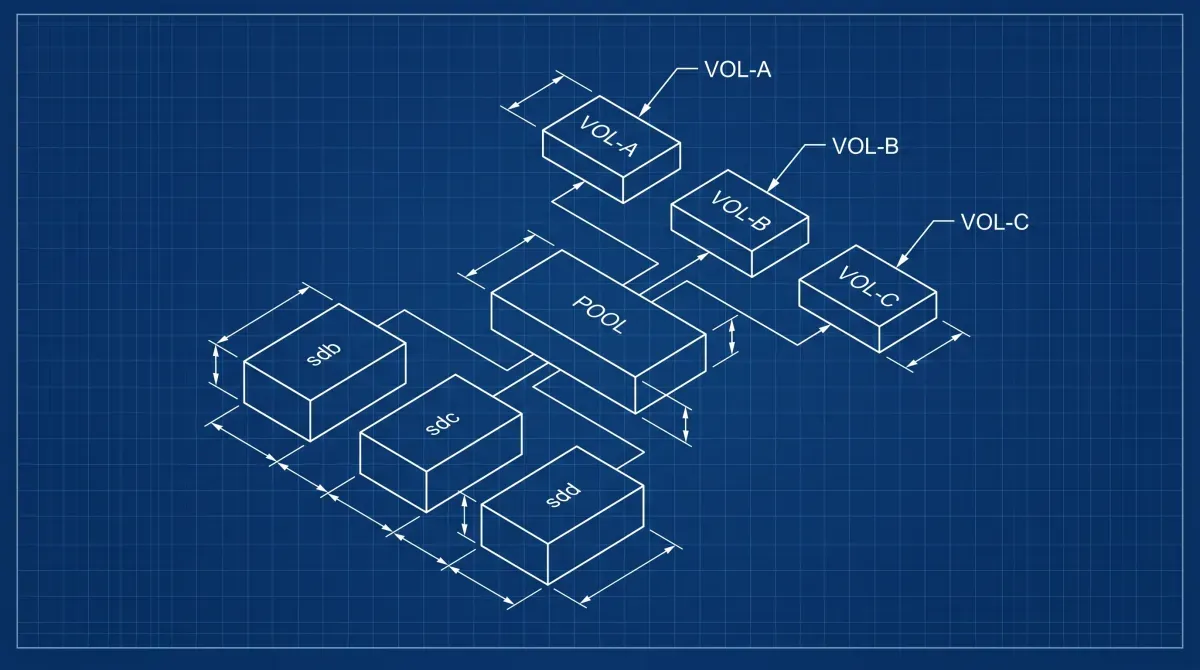
Stratis is a local storage management system for Linux. Under the hood it uses device-mapper and XFS. It’s not a new filesystem. Think of it as an opinionated management layer that gives you:
- Thin provisioning via device-mapper
- Snapshots (copy-on-write, writable)
- Pool-based storage with multiple block devices
- Encryption via LUKS2 with Clevis/Tang integration (hardware token or network-based unlock)
- Tiering support (NVMe cache + spinning disk data)
The key pitch: you get most of what you’d want from ZFS for day-to-day storage management without loading kernel modules, dealing with ARC tuning, or fighting licensing issues on some distributions.
Stratis vs ZFS vs Btrfs: Homelab Reality Check
| Feature | Stratis | ZFS | Btrfs |
|---|---|---|---|
| Filesystem | XFS (managed) | ZFS native | Btrfs native |
| RAID support | No native RAID | RAID-Z 1/2/3 | RAID 0/1/10 (RAID 5/6 unstable) |
| Snapshots | Yes (writable) | Yes (read-only + writable) | Yes |
| Encryption | LUKS2/Clevis (3.x+) | Native (OpenZFS 2.x) | No native (use LUKS underneath) |
| Send/receive | No | Yes | Yes |
| Kernel module | No (dm-based) | Out-of-tree (DKMS) | In-tree |
| Proxmox native | No | Yes | Partial |
| Learning curve | Low | High | Medium |
Where Stratis wins: Simple encrypted pool on RHEL/Fedora-family systems, thin provisioning without the ZFS overhead, Clevis/Tang network unlock for automated server boot.
Where ZFS wins: Multi-drive RAID with real data integrity checksumming, snapshot streaming for backup pipelines, large-scale NAS where ARC memory is worth tuning.
Where Btrfs wins: Single-drive or mirrored setups where you want subvolumes and snapshots baked into the filesystem on mainstream kernels, especially on openSUSE.
For a Proxmox homelab specifically: ZFS remains the better choice for VM disk images if you want snapshot-based backups via Proxmox’s built-in tooling. Stratis makes more sense as secondary storage for ISOs, bulk data, or an encrypted NAS mount point.
Installing Stratis
On Fedora, RHEL 8/9, or AlmaLinux:
sudo dnf install stratisd stratis-cli
sudo systemctl enable --now stratisd
On Debian/Ubuntu (less native, but functional):
sudo apt install stratisd stratis-cli
sudo systemctl enable --now stratisd
Confirm the daemon is running:
stratis daemon versionCreating a Basic Pool
Identify your target drives (use drives with no existing partitions or wipe them first):
lsblk
sudo wipefs -a /dev/sdb /dev/sdc
Create the pool and a filesystem:
sudo stratis pool create datapool /dev/sdb /dev/sdc
sudo stratis filesystem create datapool media
sudo mkdir -p /mnt/media
sudo mount /dev/stratis/datapool/media /mnt/media
Add to /etc/fstab for persistent mount (use the UUID reported by stratis filesystem list):
/dev/stratis/datapool/media /mnt/media xfs defaults,x-systemd.requires=stratisd.service 0 0Stratis 3.9 Encryption Setup
Stratis 3.9 shipped with improvements to Clevis/Tang-based encryption, making network-bound disk encryption (NBDE) more reliable for automated unlocking on headless servers. Phoronix covered the release details here.
Option 1: Simple passphrase encryption
# Create a key in the kernel keyring
sudo stratis key set --capture-key homelab-key

# Create an encrypted pool
sudo stratis pool create --key-desc homelab-key encrypted-pool /dev/sdd

# Create a filesystem on it
sudo stratis filesystem create encrypted-pool vms
sudo mount /dev/stratis/encrypted-pool/vms /mnt/vms
The key lives in the kernel keyring for the session. On reboot, you’ll need to re-add it before mounting.
Option 2: Clevis/Tang network unlock (automated headless boot)
This is the 3.9 improvement worth caring about for homelabs. You run a Tang server (can be a cheap VM or container) and Stratis pools unlock automatically on boot when they can reach it.
Stand up a Tang server (on another machine or VM, per the Tang README):
sudo dnf install tang          # Debian/Ubuntu: sudo apt install tang
sudo systemctl enable tangd.socket --now
# tangd listens on port 80 by default; get the thumbprint clients pin to:
sudo tang-show-keys
Keep the Tang keys off the disk they protect: the Tang README warns against storing them on the same physical medium.
Create a Clevis-bound encrypted Stratis pool:
# Install clevis integration
sudo dnf install clevis clevis-luks clevis-dracut

# Create a pool bound to Tang, plus a keyring passphrase as fallback
sudo stratis key set --capture-key mykey
sudo stratis pool create \
  --key-desc mykey \
  --clevis tang --tang-url http://192.168.1.50 --thumbprint <thp-from-tang-show-keys> \
  secure-pool /dev/sde

sudo stratis filesystem create secure-pool backups
On reboot, as long as the Tang server is reachable, the pool unlocks without a passphrase prompt. If the Tang server is unavailable, you can still unlock with the keyring passphrase (--key-desc), which is why it is worth setting both.
Taking and Using Snapshots
# Create a snapshot
sudo stratis filesystem snapshot secure-pool backups backups-snap-$(date +%Y%m%d)

# List filesystems and snapshots
sudo stratis filesystem list

# Mount a snapshot read-write
sudo mkdir /mnt/snap
sudo mount /dev/stratis/secure-pool/backups-snap-20260428 /mnt/snap
Snapshots are writable and space-efficient. They don’t replace a real backup strategy, use them for quick rollbacks before risky changes.
Adding a Cache Tier (NVMe + HDD)
If you have an NVMe drive and spinning disks:
sudo stratis pool add-data datapool /dev/sdb /dev/sdc    # HDDs
sudo stratis pool init-cache datapool /dev/nvme0n1p4     # NVMe partition
Stratis handles the bcache-based tiering automatically. Frequently read blocks get cached on NVMe, writes go to the faster tier first.
Monitoring Pool Health
# Pool overview
stratis pool list

# Filesystem usage
stratis filesystem list

# Detailed blockdev info
stratis blockdev list datapool
There’s no built-in alerting, wire it into your monitoring stack (Prometheus node exporter picks up underlying dm-thin metrics, or script a cron job parsing stratis pool list output).
Recommended hardware
NAS drives suited to homelab storage (affiliate links. They help fund the site at no extra cost to you):
- WD Red Plus 4TB NAS HDD
- Seagate IronWolf 4TB NAS HDD
- Synology DS224+ NAS: if you want a turnkey enclosure
What’s Next
- Proxmox VE Homelab Setup: set up the host your storage VMs run on
- Grafana + Prometheus Monitoring: alert on pool capacity and disk health
- Linux Homelab Security Hardening: Complete Checklist (2026): Encryption at rest and the rest of the storage-host baseline
[discussion]
Comments are powered by Giscus — backed by GitHub Discussions. Sign in with GitHub to join the conversation.