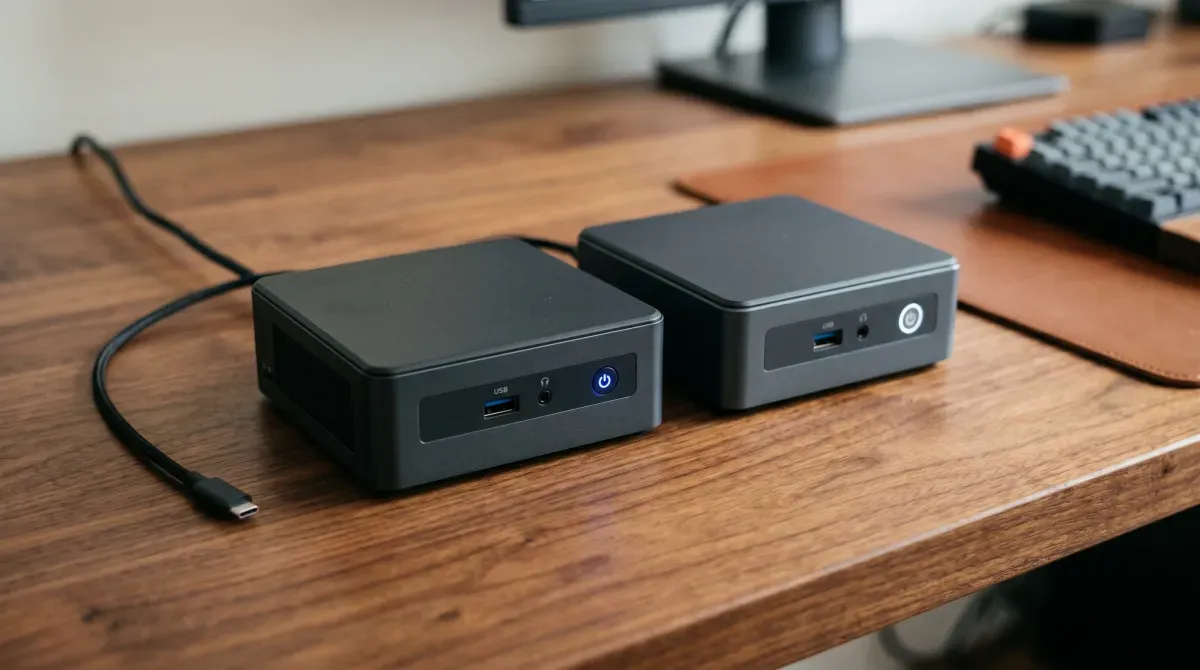
The era of rack servers in the spare bedroom is over — at least for most of us. A single 1U server idles at 80–150W and sounds like a jet engine. A modern mini PC idles at 6–12W, fits in a drawer, and runs the same workloads silently.
The Intel N100 chip changed the calculation: a capable homelab for under €200 and roughly €1/month in electricity. The question is no longer “can a mini PC do it” but “which one, and for what.”
This guide answers that question properly. Not with benchmark scores that don’t reflect real homelab workloads — but with honest assessments of what each tier of hardware actually handles.
What Your Workload Actually Needs
Before looking at hardware, be honest about what you’re running. Most homelab disappointment comes from buying the wrong tier.
Lightweight homelab (N100 is perfect):
- Pi-hole, AdGuard
- Home Assistant
- Uptime Kuma, Grafana, Prometheus
- Nextcloud (low traffic)
- Ollama with small models (3b, CPU-only)
- 10–15 Docker containers
Medium homelab (N305 or Ryzen 5000 series):
- Everything above, plus:
- Proxmox with 3–5 VMs
- Jellyfin with hardware transcoding
- Ollama with 7b models (GPU or fast CPU)
- n8n automation + multiple services
Heavy homelab (Ryzen 7000+ or MS-01):
- Proxmox cluster nodes
- Many VMs simultaneously
- Local LLM serving at 7b–13b
- GPU-accelerated workloads via eGPU
- 10GbE networking
- Development environments
The Hardware Tiers
Tier 1 — Under €200: The N100/N150 Sweet Spot
The Intel N100 is a 6W chip with 4 efficiency cores that consistently surprises people. With a 6W base TDP, an N100 mini PC idles around 6–8W — compared to older x86 homelab servers that easily drew 70W or more. Over a month, running at roughly 10W instead of 70W cuts electricity cost by about 85%.
If you are buying new in 2026, you will likely end up with an N150 or N355 rather than the N100 itself — the N150 is the refreshed successor shipping in current stock. Think of it as “N100 plus a little”: the same core count and architecture with a 6–10% performance bump.
Beelink EQ12 / EQ14 (~€150–180)
The Beelink EQ12 with dual 2.5GbE NICs is popular for pfSense/OPNsense firewalls and general homelabbing. N100-based models are the best value in the mini PC market right now.
What you get:
- Intel N100 or N150, 4 cores
- 16GB DDR5 RAM (upgradeable)
- 500GB NVMe SSD
- Dual 2.5GbE (EQ12 — the standout spec at this price)
- Wi-Fi 6, Bluetooth 5
- 2× HDMI, USB 3.2
On 16GB RAM, a typical N100 Proxmox host can comfortably run Pi-hole, Home Assistant, Nextcloud, a media server, and monitoring simultaneously — 6 services using roughly 2–3GB total, with headroom remaining.
GMKtec G3 Plus / NucBox series (~€120–150)
The budget alternative to Beelink. The GMKtec G3 Plus with Intel N150 is solid for basic server tasks — 16GB DDR4 RAM, 512GB NVMe SSD, 2.5GbE, and WiFi 6 at a lower price than the Beelink equivalent.
Slightly lower build quality than Beelink. Fine for a dedicated single-purpose node. Less ideal as your only machine.
The honest N100 ceiling:
For 80% of homelab users the N100 is the smarter choice. Start with it — you can always add a second N100 box later for less than the cost difference to an N305. Where it genuinely struggles: running Ollama with any model above 3b parameters without a GPU, Proxmox with more than 3 simultaneous VMs, or anything CPU-intensive at sustained load.
Tier 2 — €200–350: The N305/Ryzen Performance Jump
Beelink EQi3-N305 (~€220–250)
The EQi3-N305 pairs the 8-core CPU with 16GB DDR5 RAM, a 500GB NVMe SSD, and dual Ethernet. A good all-rounder if you want the Beelink ecosystem but need more cores for Proxmox or multi-user workloads.
The N305 has 8 efficiency cores vs the N100’s 4. The N305 can handle 30–40 containers without breaking a sweat. Most homelab users run fewer than 15 containers, making the N100 perfectly adequate — but if you’re planning a Proxmox cluster or need multiple VMs running simultaneously, the N305’s extra cores become essential.
Power draw is roughly double the N100 at 12–18W idle. Still extremely efficient compared to anything with a desktop CPU.
Beelink SER5 / SER6 (AMD Ryzen 5000/6000 series) (~€220–300)
The AMD alternative. The Beelink with the Ryzen 5500U can be upgraded to 64GB of RAM inexpensively — which is why it sits at the top of many homelabbers’ shortlists.
The Ryzen 5 5500U (6 cores, 12 threads) outperforms the N305 on multi-threaded workloads. Better for Ollama without a GPU — the 7b models become genuinely usable at useful token speeds. Slightly higher idle power than N-series at 15–20W.
Who this tier is for: You’re running Proxmox with 4–6 VMs, you want to run Ollama with Mistral or Llama 3.1 8b for real daily use, or you’re building a two-node cluster and need each node to carry more weight.
Tier 3 — €350–600: The Power User Options
MinisForum UM790 Pro (AMD Ryzen 9 7940HS) (~€400–450)
The MinisForum UM790 Pro with AMD Ryzen 9 7940HS has 8 cores, 16 threads, 32GB RAM, and Oculink for eGPU connectivity — a beast in a small box.
The Oculink port is what makes this special for AI homelabbers. Attach an eGPU enclosure with an NVIDIA RTX card and you have a proper GPU server in a 1-litre box. Run Ollama with 13b or 70b models at real speed. Idle power around 20–25W.
Beelink SER9 Pro (AMD Ryzen AI 9 365) (~€450–500)
The Beelink SER9 Pro combines AMD Ryzen AI 9 365 with a 73 TOPS NPU for local AI workloads — designed for users who want to run AI applications, handle multiple 4K streams, and manage complex workloads simultaneously.
The NPU is increasingly useful as local AI tooling learns to target it. Not yet essential, but relevant if you’re planning a 3–5 year machine.
Tier 4 — €600+: The MinisForum MS-01
The MinisForum MS-01 is the homelab darling. Dual 10GbE SFP+, dual 2.5GbE, three M.2 slots, and space for a 2.5-inch drive. It’s a mini server, not just a mini PC — and arguably the best purpose-built mini homelab server available.
This is the machine for a serious single-node homelab or a flagship node in a Proxmox cluster. The dual 10GbE is what separates it — internal VM and container traffic at line rate, no bottleneck between storage and compute.
What you pay for beyond the networking: three NVMe slots (OS + VM storage + data, each on separate drives), proper thermal design for 24/7 sustained load, and a platform the homelab community has extensively documented.
Power draw: 20–35W idle depending on RAM and drives fitted. Higher than the N100 tier but justified by the capability gap.
The Used Business Machine Alternative
HP’s EliteDesk Mini and similar 1-litre business desktops show up on the used market in bulk as companies refresh their fleets. Business-class reliability, excellent driver support, consistent BIOS updates even for older models, and used pricing that’s hard to beat.
A used HP EliteDesk 800 G6 Mini with an Intel Core i5-10500T:
- 6 cores, 12 threads, 35W TDP
- 32GB DDR4 (upgradeable to 64GB)
- NVMe slot + 2.5” SATA bay
- Intel UHD 630 (Quick Sync for Jellyfin transcoding)
- Available for €100–150 on eBay
For pure performance-per-euro this often beats new mini PCs at the same price. The catch: no 2.5GbE, higher idle power (18–25W), and you’re buying aging hardware with no warranty.
What to Actually Buy: Decision Tree
Running for the first time, not sure what you need: → Beelink EQ12 or EQ14, 16GB (~€160–180)
Want Proxmox with real VM density, or Ollama with 7b models: → Beelink SER5/SER6 (Ryzen 5500U/6600H), 32GB (~€250–300)
Building a proper cluster node or need 10GbE: → MinisForum MS-01 (~€600)
Want GPU AI inference in a compact form factor: → MinisForum UM790 Pro + eGPU enclosure (~€600–800 total)
Tightest possible budget, just Docker services: → GMKtec G3 Plus or used HP EliteDesk (~€120–150)
RAM and Storage: Don’t Underbuy
The mini PC itself is rarely the bottleneck. RAM and storage are.
RAM:
| Workload | Minimum | Recommended |
|---|---|---|
| Docker only (10–15 containers) | 8GB | 16GB |
| Proxmox with 2–3 VMs | 16GB | 32GB |
| Proxmox with 4–6 VMs | 32GB | 64GB |
| Ollama 7b model | 16GB | 32GB |
| Ollama 13b+ model | 32GB | 64GB |
Buy the machine with 16GB and verify it’s upgradeable before purchasing. Most mini PCs use standard SO-DIMM slots — RAM is cheap. A €30 RAM upgrade often matters more than a €100 CPU upgrade.
Storage:
Run two drives if you can:
- NVMe 1 (500GB–1TB) — Proxmox OS, VM storage, containers
- NVMe 2 or 2.5” SATA (1–4TB) — data, backups, media
The OS drive will be read/written constantly. NVMe gives you the speed and endurance for this. SATA is fine for bulk storage.
For the OS NVMe, 500GB is the practical minimum for a real homelab. Running out of VM storage space is one of the most common beginner frustrations.
Power Consumption: The Numbers That Matter
Running 24/7 means your idle wattage directly determines your annual electricity cost. At €0.25/kWh (EU average 2026):
| Hardware | Idle watts | Annual cost |
|---|---|---|
| Intel N100 mini PC | 7W | ~€15/yr |
| Intel N305 mini PC | 15W | ~€33/yr |
| Ryzen 5500U mini PC | 18W | ~€39/yr |
| MinisForum MS-01 | 28W | ~€61/yr |
| Used HP EliteDesk (i5-10500T) | 22W | ~€48/yr |
| Old desktop (Core i7-8700) | 65W | ~€142/yr |
| 1U rack server (Xeon) | 120W | ~€263/yr |
The N100 homelab costs roughly €15/year to run. A rack server doing the same job costs €263/year just in electricity — before any hardware cost. Over three years that’s a €740 difference. The mini PC pays for itself.
What Each Machine Runs From This Site’s Guides
| Guide | N100 | N305 | Ryzen 7 | MS-01 |
|---|---|---|---|---|
| Ollama + Open WebUI — 3b model | ✅ | ✅ | ✅ | ✅ |
| Ollama — 7b model (CPU) | 🐢 slow | ✅ | ✅ | ✅ |
| Grafana + Prometheus | ✅ | ✅ | ✅ | ✅ |
| n8n + Ollama workflows | ✅ | ✅ | ✅ | ✅ |
| Ansible (control node) | ✅ | ✅ | ✅ | ✅ |
| Proxmox — 3 VMs | ✅ | ✅ | ✅ | ✅ |
| Proxmox — 6+ VMs | ❌ | ✅ | ✅ | ✅ |
| Jellyfin hardware transcode | ✅ | ✅ | ✅ | ✅ |
| 10GbE internal networking | ❌ | ❌ | ❌ | ✅ |
Brands to Trust, Brands to Avoid
Reliable: Beelink, MinisForum, GMKtec (budget), ASUS NUC, HP EliteDesk (used), Lenovo ThinkCentre (used)
Approach with caution: Unknown AliExpress brands, anything claiming specs that seem too good for the price, machines without clear RAM/storage upgrade paths listed
Dozens of companies sell mini PCs — many are rebranded versions of the same hardware from the same factory. Beelink is the brand most commonly deployed and trusted in the homelab community based on first-hand experience.
Warning: Some lesser-known brands have shipped Windows installations containing malware pre-installed. If buying from an unfamiliar brand, wipe and reinstall the OS before connecting to your network.
If buying from a less-known brand: check the exact model on Reddit (r/homelab, r/minipc), verify the BIOS allows booting Linux, and confirm RAM is upgradeable before ordering.
My Actual Recommendation for Someone Starting Out
Buy a Beelink EQ14 with 16GB RAM (~€170). Here’s why:
- Dual 2.5GbE at this price is exceptional — most machines at €300+ don’t have this
- N150 handles the full Docker stack from every guide on this site
- 16GB runs Proxmox with 3 lightweight VMs comfortably
- Runs Ollama with llama3.2:3b or phi3 at perfectly usable speeds
- Fanless or near-silent under normal load
- If you outgrow it in 12 months, add a second one for a two-node cluster — still cheaper than stepping up to a Ryzen machine
The worst outcome is spending €450 on a Ryzen machine on day one, then realising most of your containers use 200MB RAM each and an N100 would have been fine.
Start small. The mini PC market moves fast — what you buy in 18 months will be better and cheaper than what’s available today.
Recommended hardware
What I’d buy today (affiliate links — they help fund the site at no extra cost to you):
- Beelink EQ12 Pro (N100) — my pick for a first node
- Minisforum MS-01 — if you need more power/PCIe
- Crucial 32GB DDR5 SO-DIMM — max out the RAM early
- Samsung 990 Pro NVMe SSD — fast boot + VM storage
[discussion]
Comments are powered by Giscus — backed by GitHub Discussions. Sign in with GitHub to join the conversation.