You want to ditch Google Photos and host your own photo library. You’ve narrowed it down to two options: Immich and PhotoPrism. Both are open source, both run in Docker, both handle face recognition and map views and mobile uploads. But they’re built very differently, they need very different hardware, and they suit different setups.
This is the comparison I wish I had when I was deciding. No marketing language, no feature-matrix padding — just what matters when you’re choosing which one to deploy on your homelab server.
The Short Version
Immich is the full Google Photos replacement. Native mobile apps, multi-user support, shared albums, memories, partner sharing, background upload. It’s feature-rich and actively developed at a fast pace. The trade-off: it runs five containers and comfortably wants 4–6 GB of RAM.
PhotoPrism is the lean alternative. One or two containers, runs on 1–2 GB of RAM, works on a Raspberry Pi 4. Strong indexing and search, nice web UI, but no native mobile app — it uses a Progressive Web App (PWA) instead. Better suited for a single user managing a large existing photo library than for a multi-user household replacing Google Photos.
Resource Requirements
This is where the decision starts for most homelabbers. Your hardware dictates what’s realistic.
Immich
| Component | RAM Usage | Purpose |
|---|---|---|
| immich-server | ~500 MB | API, web UI, background jobs |
| immich-machine-learning | 1.5–3 GB | Face recognition, CLIP search, object detection |
| PostgreSQL (pgvecto-rs) | 500 MB–1 GB | Metadata, vector search indexes |
| Redis | ~30 MB | Job queue, caching |
| Total idle | ~3–4 GB | |
| During initial indexing | 4–6+ GB | ML model loads spike RAM significantly |
Immich’s machine learning container is the hungry one. It loads TensorFlow models into memory for face detection, object classification, and CLIP-based semantic search (search by description like “sunset at the beach”). During initial library indexing, CPU usage will spike to 100% across all cores for hours, sometimes days, depending on library size.
Minimum viable hardware: 4-core CPU, 8 GB RAM, SSD for database storage.
Comfortable hardware: 6+ cores, 16 GB RAM. A GPU (even an Intel iGPU) dramatically speeds up ML processing.
PhotoPrism
| Component | RAM Usage | Purpose |
|---|---|---|
| photoprism | 500 MB–1.5 GB | Everything: web UI, indexing, search, face recognition |
| MariaDB (optional) | 200–400 MB | Metadata storage (can use SQLite instead) |
| Total idle | ~800 MB–1.5 GB | |
| During initial indexing | ~2–3 GB | Temporary spike during TensorFlow classification |
PhotoPrism bundles its ML inference directly into the main Go binary — no separate container needed. It’s less accurate than Immich’s dedicated ML pipeline but far lighter on resources.
With SQLite instead of MariaDB, the entire stack is a single container using under 1 GB at idle.
Minimum viable hardware: 2-core CPU, 2 GB RAM. Runs on a Raspberry Pi 4 (4 GB model).
Comfortable hardware: 4 cores, 4 GB RAM. No GPU needed.
Architecture Comparison
Immich: Five Containers, Microservice Style
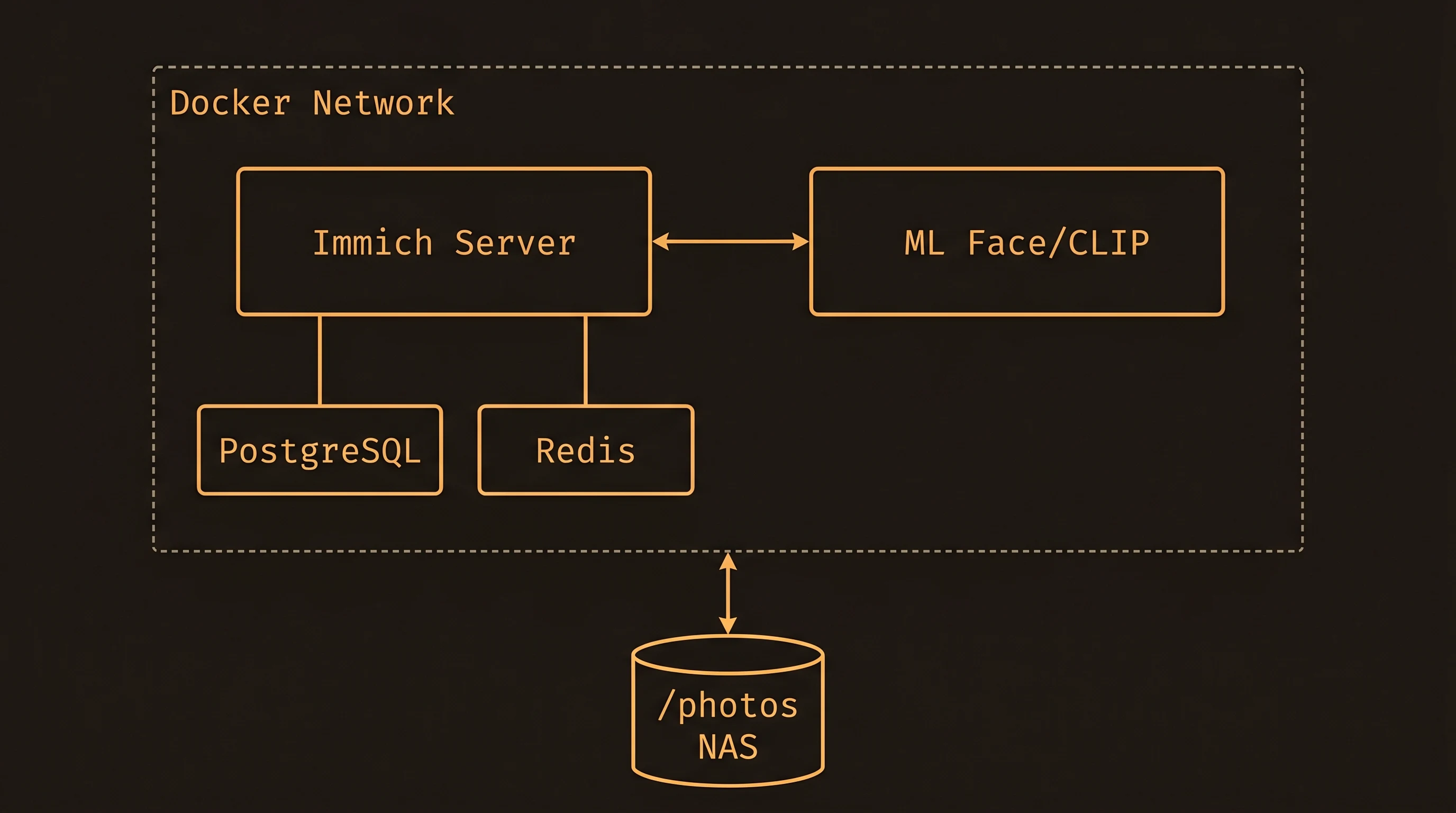
Each service is isolated and independently scalable. The downside: more containers to manage, more points of failure, and PostgreSQL with the vector extension is a heavier database than what most people are used to backing up.
PhotoPrism: One Container Does (Almost) Everything
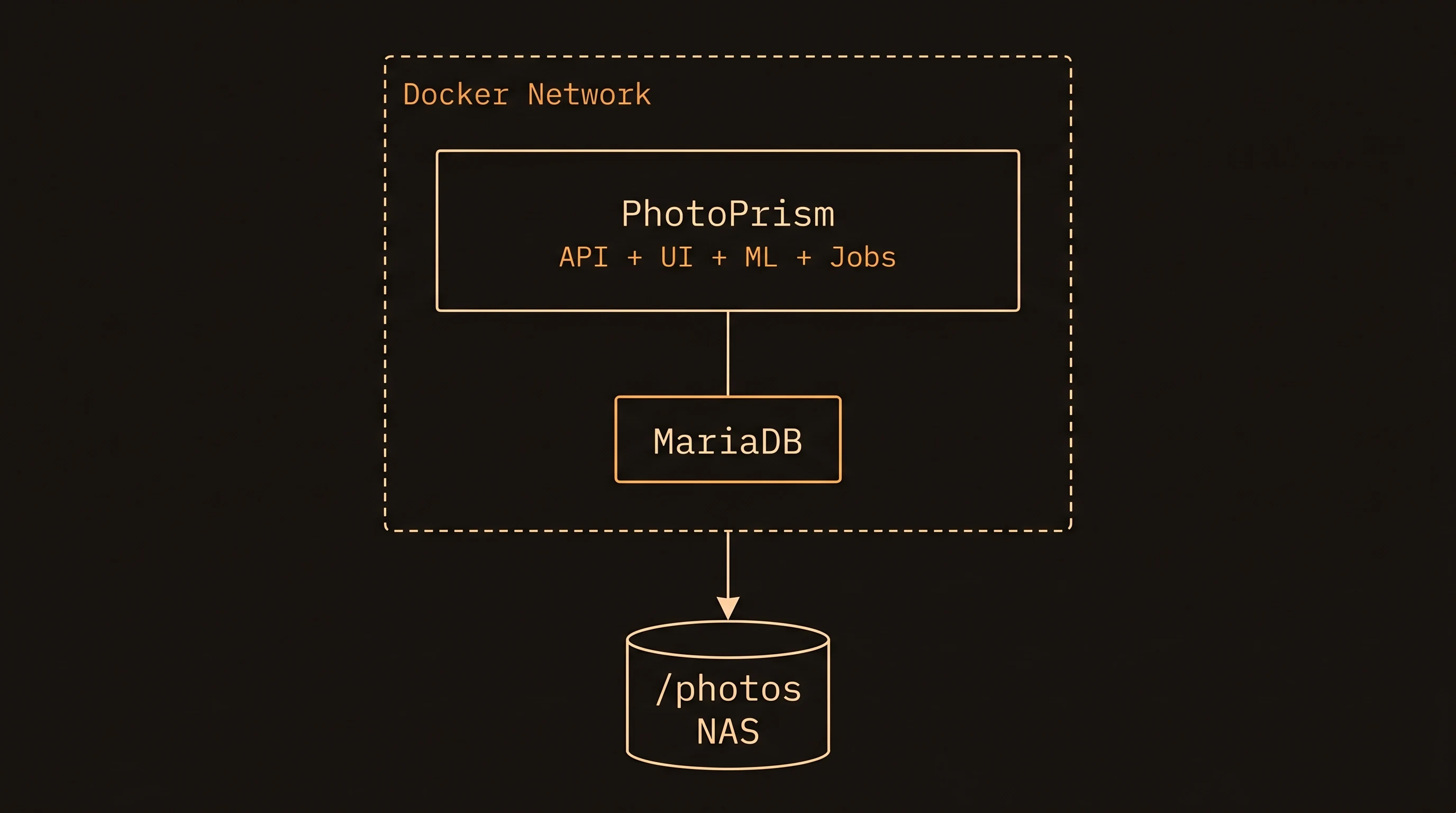
Simpler to deploy, simpler to back up, fewer things that can break. With SQLite, you eliminate the database container entirely — everything is one container and one file.
Feature Comparison
Where Immich Wins
Native mobile apps. Immich has dedicated iOS and Android apps with automatic background photo upload, just like Google Photos. This is the killer feature for most households. You install the app, point it at your server, and photos sync automatically.
Multi-user and sharing. Immich has proper multi-user support with individual accounts, partner sharing (two users see each other’s libraries), shared albums, and link sharing. It’s designed for families.
Memories and timeline. The “On This Day” memories feature, year-based timeline, and map view are polished and feel native. The web UI is fast and modern.
Semantic search. Thanks to the CLIP model, you can search for “dog on a beach” or “birthday cake” and get relevant results. PhotoPrism has keyword-based search from its classification model, but it’s not as flexible.
Active development pace. Immich ships major features monthly. The project has grown explosively since 2022 and has a large contributor base.
Where PhotoPrism Wins
Runs on minimal hardware. A Raspberry Pi 4, an old laptop, a low-RAM NAS — PhotoPrism works where Immich simply can’t fit. If your server has 2–4 GB of RAM, PhotoPrism is your only realistic option between the two.
Simpler operations. One or two containers, optional SQLite (a single file you can back up with cp), no vector database extensions, no separate ML service. Less to go wrong, less to understand.
Existing library focus. PhotoPrism excels at indexing and organizing a large existing photo collection stored on a NAS. You point it at a directory, it indexes everything, and you browse via the web UI. It doesn’t try to be the primary storage — your files stay exactly where they are, organized however you already have them.
Mature and stable. PhotoPrism has been around longer and changes less frequently. If you want “set and forget,” it’s the safer bet.
RAW file support. PhotoPrism handles RAW photo formats well out of the box, which matters if you shoot with a mirrorless camera and store RAW+JPEG.
Where They’re Roughly Equal
Both handle face recognition, GPS-based map views, video playback, EXIF metadata, and album organization. Both run in Docker. Both are actively maintained and open source. Both can point at external NAS storage via bind mounts.
Docker Compose: Both Stacks Side by Side
Immich
# /opt/stacks/immich/compose.yml
services:
  immich-server:
    image: ghcr.io/immich-app/immich-server:release
    volumes:
      - /srv/photos:/usr/src/app/upload
      - /etc/localtime:/etc/localtime:ro
    env_file: .env
    ports:
      - "2283:2283"
    depends_on:
      - redis
      - database
    restart: always

  immich-machine-learning:
    image: ghcr.io/immich-app/immich-machine-learning:release
    volumes:
      - model-cache:/cache
    env_file: .env
    restart: always

  database:
    image: tensorchord/pgvecto-rs:pg14-v0.2.0
    env_file: .env
    volumes:
      - pgdata:/var/lib/postgresql/data
    restart: always

  redis:
    image: redis:6.2-alpine
    healthcheck:
      test: redis-cli ping || exit 1
      interval: 30s
      timeout: 5s
      retries: 3
    restart: always

volumes:
  pgdata:
  model-cache:
# /opt/stacks/immich/.env
DB_PASSWORD=change-me-to-something-secure
DB_USERNAME=postgres
DB_DATABASE_NAME=immichPhotoPrism
# /opt/stacks/photoprism/compose.yml
services:
  photoprism:
    image: photoprism/photoprism:latest
    ports:
      - "2342:2342"
    environment:
      PHOTOPRISM_ADMIN_USER: "admin"
      PHOTOPRISM_ADMIN_PASSWORD: "change-me-to-something-secure"
      PHOTOPRISM_SITE_URL: "http://localhost:2342/"
      PHOTOPRISM_DATABASE_DRIVER: "mysql"
      PHOTOPRISM_DATABASE_SERVER: "mariadb:3306"
      PHOTOPRISM_DATABASE_NAME: "photoprism"
      PHOTOPRISM_DATABASE_USER: "photoprism"
      PHOTOPRISM_DATABASE_PASSWORD: "change-me-db-password"
      PHOTOPRISM_ORIGINALS_LIMIT: 5000        # max file size in MB
      PHOTOPRISM_DETECT_NSFW: "false"
      PHOTOPRISM_EXPERIMENTAL: "false"
    volumes:
      - /srv/photos:/photoprism/originals:ro   # your photo library, read-only
      - photoprism-storage:/photoprism/storage  # thumbnails, cache, sidecar files
    depends_on:
      - mariadb
    restart: always

  mariadb:
    image: mariadb:11
    environment:
      MARIADB_ROOT_PASSWORD: "change-me-root-password"
      MARIADB_DATABASE: "photoprism"
      MARIADB_USER: "photoprism"
      MARIADB_PASSWORD: "change-me-db-password"
    volumes:
      - mariadb-data:/var/lib/mysql
    restart: always

volumes:
  photoprism-storage:
  mariadb-data:
Notice that PhotoPrism mounts the originals directory as read-only (:ro). It never modifies your source files. All generated thumbnails and sidecar metadata go into the separate photoprism-storage volume.
For an even leaner setup, you can drop MariaDB entirely and use SQLite:
# Minimal PhotoPrism with SQLite — single container
services:
  photoprism:
    image: photoprism/photoprism:latest
    ports:
      - "2342:2342"
    environment:
      PHOTOPRISM_ADMIN_USER: "admin"
      PHOTOPRISM_ADMIN_PASSWORD: "change-me-to-something-secure"
      PHOTOPRISM_DATABASE_DRIVER: "sqlite"
    volumes:
      - /srv/photos:/photoprism/originals:ro
      - photoprism-storage:/photoprism/storage
    restart: always

volumes:
  photoprism-storage:
One container. One volume. That’s it.
Backup Considerations
Immich
You need to back up two things: the photo files (your bind-mounted directory) and the PostgreSQL database. The database backup requires pg_dump:
docker compose exec database pg_dump -U postgres immich > immich_db_backup.sqlRestoring means importing that SQL dump into a fresh PostgreSQL container. It’s not hard, but it’s a multi-step process.
PhotoPrism
Back up the photo files (same as Immich) and the database. With MariaDB, you’d use mariadb-dump. But with SQLite, the “database” is a single file inside the storage volume — you can back it up with cp or include it in your regular NAS backup routine.
This is a real operational advantage for PhotoPrism. SQLite backups are trivially simple compared to managing PostgreSQL dumps.
Which One Should You Choose?
| Criteria | Immich | PhotoPrism |
|---|---|---|
| Idle RAM | 3–4 GB | 0.8–1.5 GB ★ |
| Minimum RAM | 8 GB | 2 GB ★ |
| Runs on Raspberry Pi 4 | ✕ | ✓ ★ |
| Containers | 4–5 | 1–2 ★ |
| Native mobile backup app | ✓ ★ | ✕ |
| Multi-user & sharing | ✓ ★ | ✕ |
| Semantic (CLIP) search | ✓ ★ | ✕ |
| Trivial SQLite backup | ✕ | ✓ ★ |
| Development pace | Fast | Stable |
Choose Immich if:
- You have 8+ GB of RAM on your server
- You want automatic phone photo backup with a native mobile app
- Multiple family members need their own accounts
- You want the closest thing to a self-hosted Google Photos experience
- You’re comfortable with a more complex stack
Choose PhotoPrism if:
- Your server has limited resources (2–4 GB RAM, older CPU)
- You’re running on a Raspberry Pi, a basic NAS, or a low-power mini PC
- You primarily want to index and browse an existing photo collection
- You’re the only user, or sharing isn’t a priority
- You value simplicity and low maintenance
Choose both (seriously): If you have the hardware, there’s nothing stopping you from running both and pointing them at the same photo directory. PhotoPrism in read-only mode won’t conflict with Immich. Try both for a week and delete the one you don’t prefer. That’s the beauty of Docker — spinning up a new stack costs you five minutes and zero commitment.
Deployment Tips
Whichever you choose, a few things apply to both:
Store the database on an SSD. Both apps do heavy random I/O during indexing. Running the database volume on spinning disks will make initial indexing painfully slow. Your photo library can stay on HDDs — that’s sequential reads, which are fine.
Put a reverse proxy in front. If you want HTTPS access (and you should, especially for mobile app sync), run Traefik or Caddy in front and give each app a subdomain like photos.yourdomain.com.
Back up before updating. Both projects move fast. Dump your database before pulling new images. Immich in particular ships breaking changes occasionally since it hasn’t reached a stable 1.0 release yet.
Monitor resource usage. If you’re running other services on the same machine, keep an eye on RAM with a monitoring stack. The ML containers in Immich can compete with other memory-hungry services.
Recommended hardware
What I’d buy to run either of these (affiliate links — they help fund the site at no extra cost to you):
- Synology DS224+ NAS — turnkey, low-power
- Raspberry Pi 5 (8GB) — enough for PhotoPrism
- Google Coral USB Accelerator — speeds up ML/face detection
What’s Next
- Docker & Docker Compose Explained — if any of the Compose concepts above were new to you, start here
- Self-Hosted Google Photos with Immich — full deployment guide with GPU acceleration and backup automation
- Docker Compose Mega-Stack — deploy Immich or PhotoPrism alongside Jellyfin, Vaultwarden, and more in one stack
- Monitoring with Grafana & Prometheus — track resource usage across all your containers
- Linux Security Hardening — lock down the host running your photo library
Running Immich or PhotoPrism on your homelab? Switched from one to the other? Share your experience in the comments — especially RAM usage on your specific hardware. It helps other homelabbers make the right call.
[discussion]
Comments are powered by Giscus — backed by GitHub Discussions. Sign in with GitHub to join the conversation.